
CustomTimer, a free countdown timer
Lastest Version: 2.3.0.2
CustomTimer_2_3_0_2.zip
What Is CustomTimer?
I wrote this program as an exercise in C# and .NET. Because it’s my first project in those technologies, it’s not the best-designed, most elegant, or fullest-featured program, but it works, and it’s free (with no adware/spyware).
Simply enter a time, choose any options you want, and hit the Enter key or the Start button (its’s pretty big – you can’t miss it!). Entering a time from which to count down from is pretty flexible, too. The following are equivalent:
- 1 minute and 30 seconds
- 1 min 30 sec
- 1m 30s
- 1:30
- 0:01:30
- :90
- 90s
So are these:
- 2 Days, 1 Hour, and 0 Minutes
- 2 d 1hr
- 2 days 1:00:00
- 49:00:00
- 49 hr
- 49 hours
- 2940 minutes
I wrote this program in summer 2006 and never included screen shots on this page. Now, in 2017, I am adding some. Here is what CustomTimer looks like running on Windows 10 (on my virtual machine, at least. I no longer have or use a Windows computer.) Note the “loop” feature, which can be a useful reminder to stretch or to stay on task, for example.
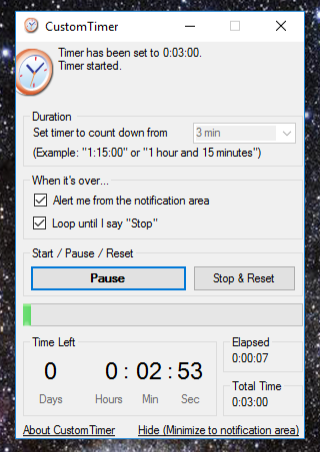
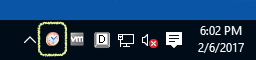
The program can be minimized to the notification area.
CustomTimer’s source code is now on GitHub, for the curious.
Download
The latest version is here: CustomTimer_2_3_0_2.zip
Unzip it and run setup.exe. Ignore any warnings that the publisher cannot be verified.
You may need to install the .Net runtime, but it will guide you through it, and it’s an easy process.
Future Improvements
In the future, I may add the ability to count down to a specific date or time. An even better feature would be custom alerts: A message box, a sound playing, a file launching, etc. Snooze might also be a good feature.
It’s been 11 years. I’m not likely to update CustomTimer.
Contact Me
Feedback of all sorts is appreciated. Contact me here.